Custom RTMP Destinations
Stream to any platform that supports RTMP using custom RTMP destinations. Set up Rumble, Kick, Telegram, Steam, and any other RTMP-compatible service.
Introduction
While playout.video offers one-click OAuth connections for major platforms like YouTube, Twitch, Facebook, TikTok, Instagram, and LinkedIn, there are many other streaming platforms that use the RTMP protocol. Custom RTMP destinations let you stream to any of these platforms by entering their RTMP URL and stream key.
This means you can stream to virtually any live streaming service in existence, as long as it provides RTMP ingest credentials.
What Is RTMP?
RTMP (Real-Time Messaging Protocol) is the standard protocol used to send live video from a streaming source to a platform's servers. When you set up a custom RTMP destination, you're telling playout.video where to send your video stream using two pieces of information:
RTMP URL (also called Server URL or Ingest URL): the address of the platform's streaming server
Stream Key: a unique identifier that tells the server which channel or account the stream belongs to
Together, these two values create a secure connection between playout.video and the destination platform.
Platforms That Use Custom RTMP
Here are popular platforms you can connect via Custom RTMP:
Rumble: growing video platform with a focus on free speech
Kick: gaming-focused streaming platform
Telegram: live streaming to Telegram channels and groups
Steam: stream to Steam's broadcasting feature
Amazon Live: product showcase streaming on Amazon
DLive: blockchain-based streaming platform
X (Twitter): live streaming on X/Twitter
Dailymotion: European video platform
Vimeo: professional video hosting with live streaming
Restream.io: if you use Restream as an intermediary
Any custom server: your own RTMP server, Nginx-RTMP, or similar
Setting Up a Custom RTMP Destination
Step 1: Get Your RTMP Credentials
On the platform you want to stream to:
Navigate to the platform's live streaming settings or broadcast settings
Look for the RTMP Server URL (sometimes labeled "Stream URL", "Ingest URL", or "Server")
Copy the Stream Key (sometimes labeled "Stream Key", "Secret Key", or "Broadcasting Key")
Important: treat your stream key like a password. Anyone with your stream key can stream to your channel.
Step 2: Add the Custom RTMP Destination
In playout.video:
Open your live stream's management page
Click Destinations in the sidebar
Click Add Destination
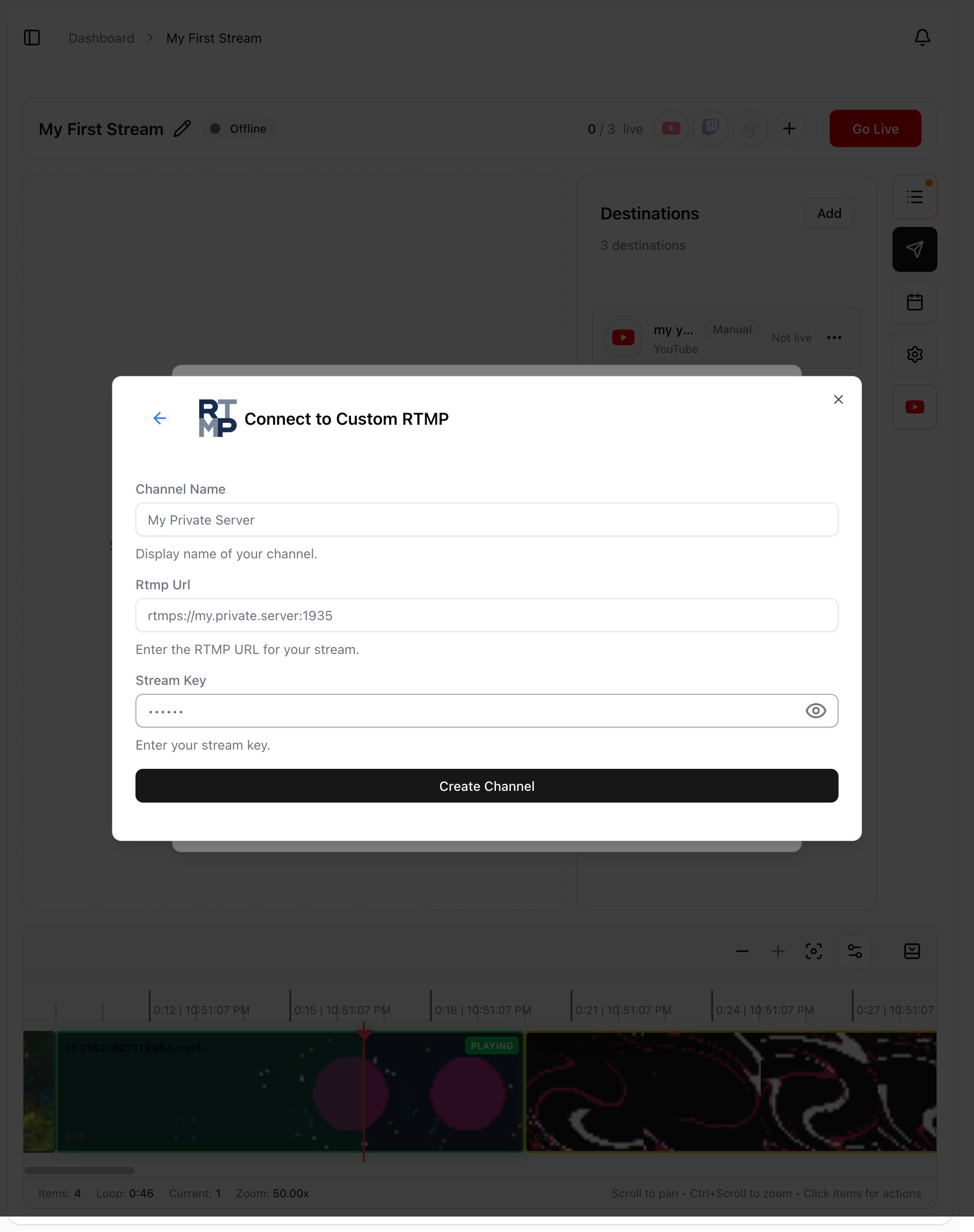
Select Custom RTMP
Fill in the fields:
Name: a recognizable name (e.g., "My Rumble Channel")
RTMP URL: paste the server URL from the platform
Stream Key: paste the stream key from the platform
Optionally enable Auto Start if you want this destination to go live automatically
Click Save
Step 3: Test the Connection
Before relying on the destination for a 24/7 stream:
Start your stream with the custom RTMP destination enabled
Go to the platform and verify your stream is appearing
Check video and audio quality
If everything looks good, you're all set
Platform-Specific Setup Guides
Rumble
Log in to your Rumble account
Go to Studio > Go Live
Copy the RTMP URL (usually
rtmp://live.rumble.com/live/)Copy your Stream Key
Add as a Custom RTMP destination in playout.video
Kick
Log in to your Kick account
Go to Dashboard > Stream
Find the Stream URL and Stream Key under the streaming settings
Add as a Custom RTMP destination in playout.video
Telegram
Telegram supports live streaming to channels and groups:
Open your Telegram channel or group settings
Start a live stream from the channel admin panel
Copy the RTMP URL and Stream Key provided by Telegram
Add as a Custom RTMP destination in playout.video
Steam Broadcasting
Log in to Steam
Go to Steam > Settings > Broadcasting
Find the RTMP credentials for external broadcasting
Add as a Custom RTMP destination in playout.video
X (Twitter)
Go to X's live streaming tools (Media Studio or equivalent)
Create a new live broadcast
Copy the RTMP URL and Stream Key
Add as a Custom RTMP destination in playout.video
RTMP URL Format
RTMP URLs typically follow this format:
rtmp://[server-address]/[application]/[stream-path]Examples:
rtmp://live.rumble.com/live/rtmp://ingest.kick.com/live/rtmp://a.rtmp.youtube.com/live2
Some platforms provide the full URL including the stream key, while others separate them. If the platform gives you a single combined URL, split it:
Everything up to and including the last
/goes in the RTMP URL fieldEverything after the last
/goes in the Stream Key field
Managing Custom RTMP Destinations
Updating Credentials
If a platform rotates your stream key or you need to update the URL:
Go to Destinations in your stream's sidebar
Click on the custom RTMP destination
Update the RTMP URL or Stream Key
Save
Multiple Custom RTMP Destinations
You can add as many custom RTMP destinations as you need. Each one operates independently:
Start and stop individual destinations without affecting others
Schedule specific destinations to go live at certain times
Mix OAuth-connected platforms with custom RTMP destinations
Auto Start
Enable Auto Start on custom RTMP destinations just like any other destination. When your stream starts, all Auto Start destinations begin broadcasting simultaneously.
Troubleshooting
Stream not appearing on the platform?
Double-check the RTMP URL for typos (even a single character matters)
Verify the stream key is correct and hasn't expired
Some platforms require you to "start" the broadcast on their end before they accept incoming streams
Check if the platform requires a specific RTMP URL format (some use
rtmps://for secure connections)
Connection keeps dropping?
Verify the RTMP URL is correct
Check if the platform has rate limits or connection restrictions
Some platforms disconnect streams that have been idle (no data) for too long
Auto-recovery will attempt to reconnect automatically
Video quality is poor on the destination?
playout.video sends the same quality to all destinations
The platform may re-encode your stream at a lower quality on their end
Check the platform's quality settings to ensure they're not limiting your stream
Platform requires RTMPS (secure RTMP)?
Some platforms require encrypted connections using
rtmps://instead ofrtmp://Make sure you're using the correct protocol prefix as specified by the platform
Stream key expired?
Many platforms rotate stream keys periodically for security
Check the platform's streaming settings for a new key
Update the stream key in your playout.video destination settings
Security Tips
Never share your stream key publicly: it grants access to stream on your channel
Rotate keys regularly: if a platform offers key rotation, use it
Use RTMPS when available: encrypted connections prevent stream key interception
Monitor your destinations: if you see unexpected streams on your channel, rotate your key immediately
Next Steps
Connecting Streaming Platforms: OAuth-connected platforms for easier setup
Multistreaming to Multiple Platforms at Once: combine custom RTMP with OAuth destinations
Scheduling Streams and Automated Actions: schedule custom RTMP destinations