24/7 Live Streaming + Live Studio. One Platform.
Run an always-on 24/7 live stream in the cloud, and jump into browser-based Live Studio with guests, scenes, and screen share whenever you want, then multistream to YouTube, Twitch, TikTok, Kick and 20+ platforms in up to 4K UHD 60fps.
No credit card required. Start on the free plan. 24/7 channel included on every paid plan. No OBS, no downloads, no hardware.
How It Works
One platform, three ways to be on air
Your 24/7 channel is included on every plan. Open Live Studio whenever you want to go on camera. Mix and match anytime, no platform switch needed.
24/7 Channel
For looped channels, music streams, and series marathons.
Import your content
Paste a video link or drag in MP4, MOV, MKV.
Build your playlist
Drag, drop, reorder. Add intros, jingles, overlays.
Hit go and walk away
Multistream to 20+ platforms. Loops 24/7 in the cloud.
Live Studio
For talk shows, podcasts, interviews, and live Q&A.
Set up scenes
Pick a layout (PIP, grid, speaker) and drop in cameras.
Invite guests by link
They join from any browser, no app or download. Push OBS or a hardware encoder in over RTMP/WHIP on Business.
Go live, record, repeat
Multistream and record to your library in one click.
Scheduled
For daily news, weekly shows, and programmed networks.
Open the calendar
Visual grid with daily / weekly / monthly recurrence.
Drop in slots
Mix playlists and live studio shows. Set fallbacks.
Let it run
Auto-start on schedule. Per-slot fallback never goes dark.
Most platforms make you choose: 24/7 looped tools or live studio software. Playout gives you both, on the same stream. Run the loop all month, drop into Live Studio for tonight's show, and slide back to the loop, on a single broadcast.
Built for Everyone
For Every Type of Streamer
Talk shows, podcasts, churches, classrooms, gaming squads, 24/7 channels, Playout.video scales with your needs.
Talk Shows & News Hosts
Run a daily live show with co-hosts and guests in the browser. Cut to b-roll from your playlist, pull viewers on camera, and record every episode for replays.
Learn more →
Interview Podcasters
Send guests a link, they join from any browser with no app. Record clean MP4s straight to your library and clip the highlights. Multistream live to YouTube and audio platforms.
Learn more →
Coaches & Live Q&A
Host weekly live sessions with members on camera, share your screen for slides or demos, and schedule recurring slots on the calendar. No software for you or them.
Learn more →
Series & Episodes
Run TV shows, web series, and episodic content on loop. Perfect for binge-worthy marathons and building loyal audiences around your content library.
Learn more →
Kids & Family Channels
Stream nursery rhymes, cartoons, and educational content 24/7. Keep young audiences engaged with continuous, safe programming parents trust.
Learn more →
Content Creators
Maximize watch hours from your existing content. Run lo-fi streams, ambient channels, music mixes, or jump into Live Studio for a release-day Q&A. Grow while you sleep.
Learn more →
Churches & Nonprofits
Launch continuous worship streams, sermon replays, and prayer channels. Schedule the Sunday service live with multi-camera Live Studio, then loop the recording all week.
Learn more →
Podcasters & Radio Stations
Create visual radio with album art and track info. Run 24/7 reruns between live shows, simulcast to multiple platforms, and bring guests on camera with one link.
Learn more →
Educators & Course Creators
Build always-on learning channels, run live lessons with screen share and students on camera, and schedule weekly office hours on the calendar across every time zone.
Learn more →
Agencies & Networks
Manage multiple branded channels with team roles and a shared media library. Hand the calendar to producers and the studio to talent, all from one workspace.
Learn more →
Businesses & Brands
Run always-on product demos and promo loops. Drop in for live launches, AMAs, and town halls with employees and customers on camera, then return to the loop.
Learn more →
Gamers & Streamers
Multistream gameplay to Twitch, YouTube, and TikTok at once. Bring co-streamers into custom scenes with screen share and webcam, and keep highlights looping when you're offline.
Learn more →
Why 24/7 Streaming?
Accelerate Your Channel Growth
You already have the content. Time to amplify it and reach audiences around the clock.
Up to 3x higher
Watch Time
from your existing content
Always-on
Subscriber Growth
means always discoverable
24/7 Live
Global Reach
for every time zone
Priority ranking
Algorithm Boost
platforms favor live streams
100% Safe & Allowed
Livestreaming 24/7 is safe and fully allowed by YouTube, Twitch, and all major platforms.
Boost Watch Time & Subscribers
Let our servers work while you sleep. Maximize revenue from your existing content library.
Reach Global Audiences
Be live for every time zone, every hour. Your audience is always watching somewhere.
Interactive live streaming
Make your stream something viewers play
Run a live quiz or poll from the studio. Your audience answers from their phones or the chat, and the results land on screen in real time.
Viewers play on their phones
A QR code on screen opens the game in the browser. No app, no account; YouTube, Twitch and Facebook chat answers count too.
Live quizzes and polls
Questions, countdowns, leaderboards and live vote bars update on your stream as people play.
An AI host, if you want one
An AI voice reads the questions and announces the results, with captions. Or host it yourself with a prompter.
Powerful Features for Serious Streamers
Everything you need for 24/7, live, and scheduled streaming
One-click imports, browser-based studio with guests, calendar programming, and enterprise-grade reliability.
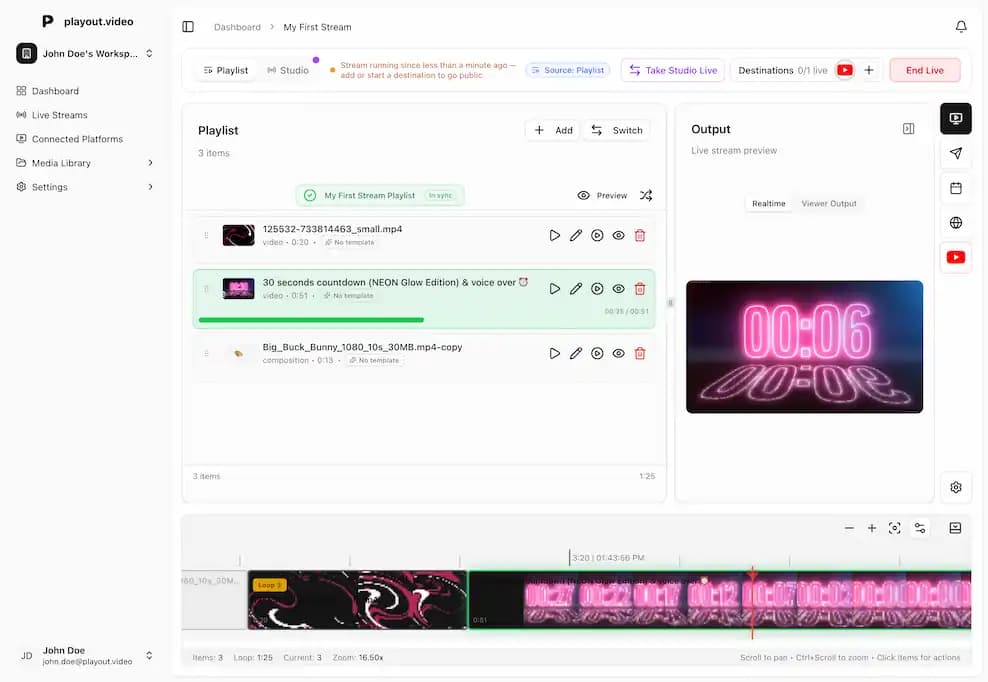
Always-On 24/7 Channel in the Cloud
Every plan runs a continuous 24/7 channel in our cloud, fully independent of your computer. Looped, scheduled, or hand-programmed, your stream keeps going whether you are online or not.
- 24/7 cloud playout included on every paid plan
- Import videos from a link: paste a URL and go
- All video formats up to 4K UHD at 60fps
- 100 GB cloud storage included, expandable in 100 GB increments
- Smart auto-recovery restores your stream in seconds
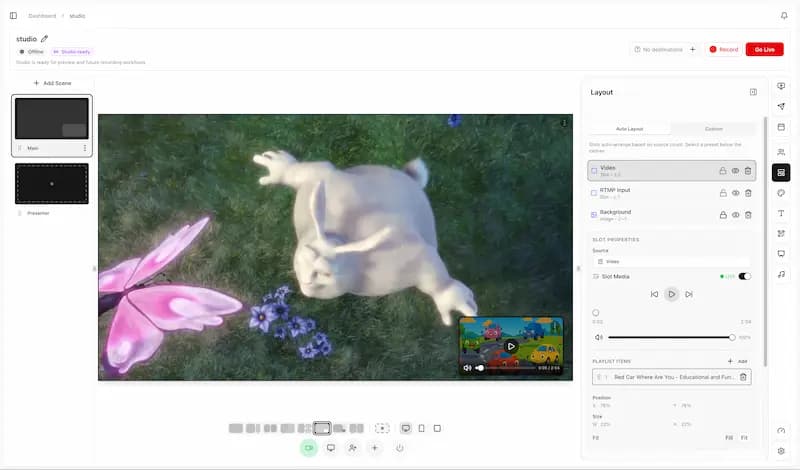
Go Live with Guests, Scenes & Overlays
Open the browser-based Live Studio, drop guests into preset or custom scene layouts, mix audio, share screens, and add live overlays.
- Live Studio included on every plan
- WebRTC guest invites: send a link, they join from any browser
- Preset and custom scene layouts (PIP, grid, speaker, side-by-side)
- Audio mixer, screen share, soundboard SFX, audio visualizer
- Record straight to your media library as MP4
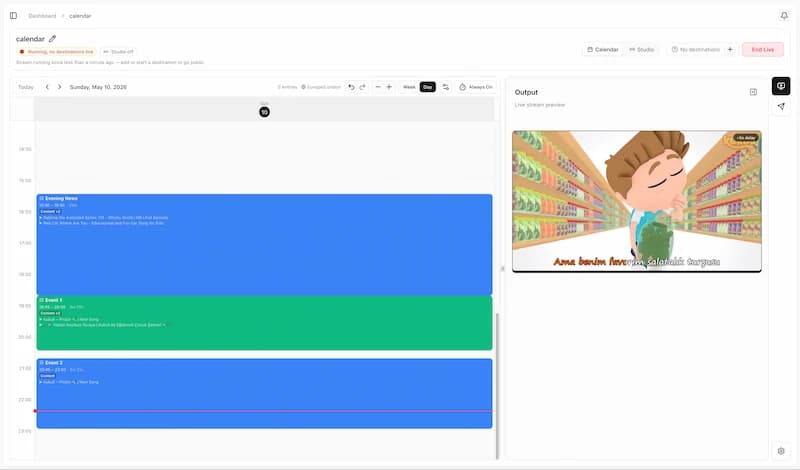
Program Your Week with Drag-and-Drop
Lay out playlists and live shows on a visual calendar. Set daily, weekly, or monthly recurrence. Mix recorded segments with live studio shows and let the channel run itself.
- Drag-and-drop calendar grid with zoom and time-nudge controls
- Daily, weekly, monthly recurrence with copy/paste between slots
- Per-slot fallback (loop, hold, black) so your channel never goes dark
- Auto-start on feed and auto-playout from scheduled entries
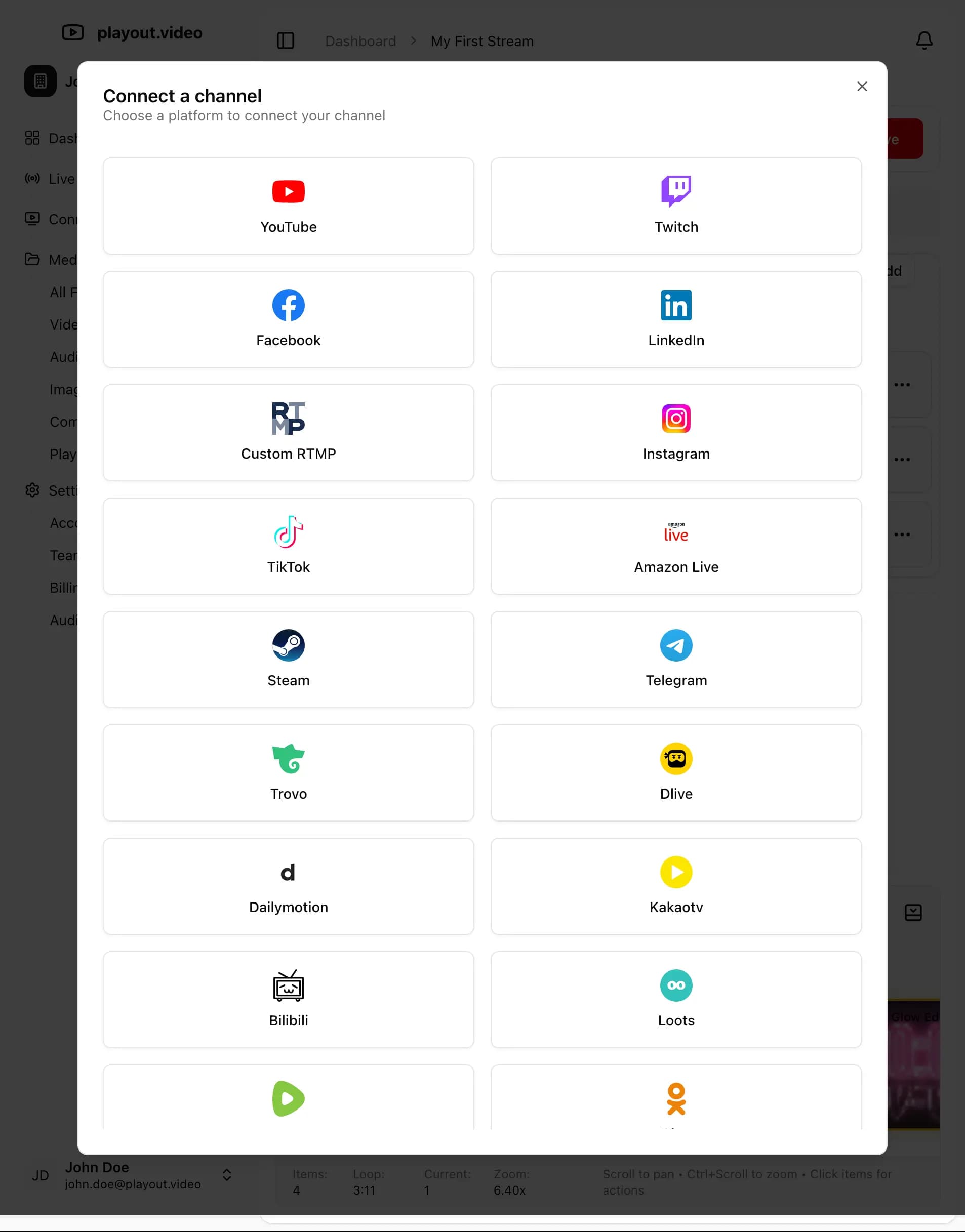
Multistream to 20+ Platforms at Once
Broadcast to YouTube, Facebook, Twitch, TikTok, Instagram, LinkedIn, Rumble, Kick, Telegram, Steam, Amazon Live, and any custom RTMP/RTMPS endpoint, all simultaneously from a single stream.
- YouTube, Twitch, Facebook, TikTok, Instagram
- LinkedIn, Rumble, Kick, Telegram, Steam, Amazon Live
- Any custom RTMP or RTMPS endpoint
- Add or remove destinations while your stream is live
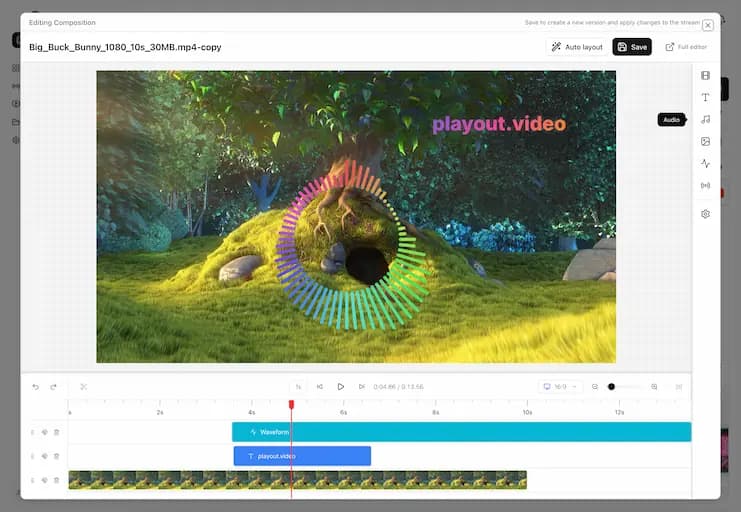
Overlays & Compositions: Edit While Live
Add text, logos, audio visualizers, Now Playing displays, and more with the built-in overlay editor. Build versioned overlay templates once and reuse them across playlists, calendar slots, and Live Studio scenes. Make changes mid-stream and they apply instantly.
- Text, image, logo, lower-third, watermark, animated SVG, web overlays
- Audio visualizer and Now Playing display
- Versioned overlay templates with drift detection
- Edit mid-stream with zero downtime
Powerful features for every type of streamer
AI Assistant for Your Channel
Ask in plain language: is my stream healthy, when do my viewers watch, what should I fix to grow? The AI assistant reads your workspace, diagnoses problems, and proposes fixes. Every change waits for your approval before it runs.
Live Studio with Guests & Scenes
Browser-based studio with guests, screen share, audio mixer, preset and custom layouts (PIP, grid, speaker), live overlays, and one-click recording to your library.
Calendar-Based Scheduled Streams
Drag-and-drop calendar scheduler with daily, weekly, and monthly recurrence. Per-slot fallback (loop, hold, black) so your channel never goes dark.
Hybrid Mode: Pivot Mid-Broadcast
Run a 24/7 channel during the day, jump into Live Studio for a guest interview at night, and slide back to the playlist when you’re done, without ever stopping the stream.
Stream to 20+ Platforms Simultaneously
Multistream to YouTube, Twitch, Facebook, TikTok, Instagram, LinkedIn, Rumble, Kick, Telegram, Steam, Amazon Live, and any custom RTMP/RTMPS endpoint.
Bring Your Own Encoder (RTMP & WHIP In)
No browser? No problem. On Business and Enterprise, push a hardware encoder, OBS, or vMix straight into Live Studio over RTMP or WHIP. We hand you a push URL and stream key, then mix your feed into scenes alongside browser guests.
Reusable Overlay Templates
Build text, logo, lower-third, watermark, audio-visualizer, and animated SVG overlays, and assign them to playlists or calendar slots in a click.
Smart Playlists & Dynamic Queues
Loop without gaps, put jingles and promos between videos, shuffle, swap inline mid-stream, and update playlists in real time with no downtime.
Studio Recording & VOD
Record your live shows straight to your media library as MP4, ready to repurpose into clips, schedule as reruns, or publish on demand. Independent of stream output.
Live Edit During Broadcast
Tweak overlays, switch scenes, adjust audio levels, and update playlists while you’re live. Changes apply instantly with zero interruption.
Up to 4K UHD at 60fps
Broadcast in 4K Ultra HD, 2K, Full HD, HD, or Standard quality at 30 or 60fps. Supports horizontal (16:9), vertical (9:16), and square (1:1).
Full Automation
Schedule streams to start/stop automatically, repeat daily or weekly, switch playlists on schedule, and trigger destination start/stop on YouTube, Facebook, and LinkedIn.
Auto-Recovery & Stream Reliability
Automatic stream recovery detects issues and restores your stream in seconds. Redundant servers, no single point of failure, 24/7 infrastructure monitoring.
Stock SFX & Audio Visualizer
Bundled soundboard SFX, audio visualizer, separate audio tracks, per-source volume control.
Team Collaboration
Invite team members as owners or members. Shared media library and audit log, perfect for agencies, networks, and churches.
Cloud Storage Included
100 GB cloud storage included with every plan, expandable in 100 GB increments. Automatic transcoding for all major formats.
The Playout.video Difference
| Without Playout.video | With Playout.video |
|---|---|
| Computer running 24/7 | Runs in the cloud, go offline anytime |
| Complex OBS setup | Just open your browser |
| One platform at a time | Stream to 20+ platforms at once |
| Manual restarts after crashes | Smart auto-recovery in seconds |
| Expensive hardware required | Zero hardware, plans from $29/mo |
| Limited by your upload speed | Cloud-native, zero bandwidth on your end |
| Basic video and low resolution | 4K UHD 60fps, all formats supported |
| Stop stream to switch content | Inline playlist switching, zero downtime |
| No live editing | Edit overlays mid-stream without stopping |
| Separate apps for live shows and 24/7 channels | One platform: 24/7, Live Studio, and Scheduled. Switch anytime. |
| Guests need to install software | Guest invites: join from any browser, no download |
| Rebuild overlays for every show | Overlay templates: versioned, reusable across shows |
Frequently Asked Questions
Have a different question, reach out to our support team by sending us a message
Is the 24/7 channel included on every plan?
Yes. Every paid plan runs an always-on 24/7 cloud channel as part of your subscription, with no per-minute billing on playout. You can loop a playlist all month, schedule it on the calendar, or hand-program it with overlays. Live Studio is the on-camera workflow that runs on top of your channel when you want to go live, and it's included with your plan. See plans and pricing.
What can the AI assistant do?
Every plan includes an AI assistant that knows your workspace. Ask it what is running, when your viewers actually watch, or how to reach YouTube monetization, and it reads your real data to answer. It can also import videos, reorder playlists, and schedule broadcasts, and every change waits for your approval before it runs. Plans include a monthly message allowance, from 20 on Free to 2,000 on Business. Meet the AI assistant.
Can I switch between a 24/7 playlist and a live show without stopping the stream?
Yes. That's Hybrid mode. Run a continuous channel during the day, jump into Live Studio for a guest interview at night, and slide back to your playlist when you're done. Same broadcast, zero downtime for viewers. Inline switching guide.
Can I go live with guests on camera?
Yes. Our browser-based Live Studio supports WebRTC guest invites. Send a link, your guest joins from any browser (no app, no download), and you can mix them into preset or custom scene layouts (PIP, grid, speaker, side-by-side). Add screen share, an audio mixer, and live overlays, then record the show straight to your library. How to run your first live show with guests.
Can I stream into Live Studio from OBS or a hardware encoder?
Yes, on the Business and Enterprise plans. You don't need OBS to use Playout: browser-based WebRTC guests work on every plan. But if you prefer it, Business and Enterprise add inbound RTMP and WHIP ingest. Add an RTMP/WHIP source and we generate a push URL and stream key you can point OBS, vMix, or a hardware encoder at, then mix that feed into your scenes like any other source.
How does Live Studio billing work?
Live Studio is included with your subscription alongside your 24/7 channel; there's no per-minute or overage billing. Preview, scene setup, and warmup are always free, and so is going on air. What scales with your plan is capabilities like the number of guests you can bring on camera and output quality. See plans and pricing.
Does my 24/7 channel cost extra to run?
No. A 24/7 channel that loops or schedules pre-recorded content is fully covered by your subscription with no per-minute billing. You can run a continuous channel all month as part of your plan.
How does scheduled streaming work?
Use the drag-and-drop calendar to program slots with daily, weekly, or monthly recurrence. Each slot can play a playlist or run a Live Studio show, with per-slot fallback (loop, hold, black) so your channel never goes dark if a source fails. Scheduling guide.
How many guests can I have on camera at once?
Live Studio supports multiple guests in a single scene. Use preset layouts (grid, speaker, side-by-side, PIP) or build a custom scene with overlays and screen share. The number of guests you can bring on camera scales with your plan. How to run your first live show with guests.
Can guests join Live Studio from a phone?
Yes. Guests join from any modern browser on desktop, laptop, tablet, or phone via a single invite link. No app install, no account, no download.
Can I record a Live Studio show without going live?
Yes. Live Studio can record straight to your media library as MP4 without publishing to any destination. Useful for podcasts and pre-records you want to schedule on the calendar later, or clip and repurpose for social.
Are overlays reusable across shows?
Yes. Overlays (text, logos, lower-thirds, watermarks, audio visualizer, animated SVG) are saved as versioned templates. Build them once, drift-sync them, and reuse them across playlists, calendar slots, or Live Studio scenes. Overlay editor guide.
Do I need special hardware or OBS?
No. Playout.video runs entirely in the cloud, so all you need is a web browser. No downloads, no installations, no complex setup. Your stream runs 24/7 independent of your computer. Learn how to create your first stream.
Can I import videos I already have on other platforms?
Yes. Paste a link to a video you own on Facebook, Instagram, TikTok, X, Vimeo or other supported platforms and it is imported into your library in the cloud, ready to add to a playlist. Import only content you own or have permission to use. See the import guide.
What video formats and resolutions do you support?
We support all major formats: MP4, MOV, MKV, AVI, WebM, and more. Stream in resolutions from 480p all the way to 4K UHD (2160p) at 30 or 60fps. Horizontal (16:9), vertical (9:16), and square (1:1) aspect ratios are all supported. Explore quality settings.
Will my stream run if my computer is off?
Yes! Your stream runs in our cloud infrastructure 24/7, completely independent of your computer. Close your browser, shut down your PC, and your stream keeps running with automatic recovery built in.
How many platforms can I stream to at once?
Stream to 20+ platforms simultaneously including YouTube, Twitch, Facebook, TikTok, Instagram, LinkedIn, Rumble, Kick, Telegram, Steam, Amazon Live, and any custom RTMP/RTMPS endpoint. Add or remove destinations mid-stream without affecting others. Multistreaming guide.
Can I edit my videos and add overlays?
Yes. Our built-in editor supports overlay types including text, logos, audio, audio visualizer, Now Playing display, and more. You can even edit compositions mid-stream and changes apply without stopping playback. Overlay editor guide.
What happens if there's an error or disconnect?
Our automatic recovery systems detect issues and restore your stream in seconds. Redundant servers and 24/7 infrastructure monitoring ensure your broadcast stays live with no manual intervention needed. Learn about auto-recovery.
Can I schedule my streams and playlists?
Yes. 5 action types (start/stop stream, switch playlist, start/stop destination) can each be one-time or recurring via cron expressions. Schedule per-destination timing, content rotations, and fully hands-free broadcasting. Scheduling guide.
What is inline playlist switching?
Inline switching lets you swap to a different playlist mid-stream with zero downtime. Viewers see no buffering or reconnection. The main playlist resumes exactly where it left off. Trigger manually or via scheduled cron expressions. Inline switching guide.
Can I create lo-fi study music or ambient streams?
Absolutely! Upload audio tracks and a background video, add overlays like an audio visualizer or Now Playing display, and start streaming. Perfect for ambient channels, music mixes, and relaxation streams. Create a lo-fi stream in 5 minutes.
Is 24/7 streaming allowed on YouTube?
Yes, 24/7 streaming on YouTube is fully permissible and encouraged. Live streams get priority in search and recommendations, helping you grow watch hours and subscribers faster. How 24/7 streaming boosts your watch hours.
Can my team collaborate on streams?
Yes. Invite team members to your workspace as owners or members. Share your media library, live streams, and compositions across your entire workspace. Team & permissions guide.
How much storage do I get?
Every plan includes 100 GB of cloud storage, expandable in 100 GB increments. All uploaded videos are automatically transcoded and optimized for streaming. Manage your media library.
Is there a free plan?
Yes! Every account starts on the permanent Free plan, no credit card required. Build your channel and go live, then upgrade anytime for more platforms and higher quality streams. Paid plans start at $19/mo billed annually ($29 month-to-month), saving up to 34% with annual billing. See plans and pricing.
Run your own 24/7 live channel
Program it like a TV station, jump in live whenever, broadcast to your site and everywhere. Pick the plan that fits, then add streams and quality as you grow.
Free
Build your channel, on us
- 1 live stream with the playout.video watermark
- 1080p30 to two destinations
- Up to 2 hours at a time
- 10GB storage · 1-hour uploads
- AI assistant · 20 messages a month
- Interactive games · 10 players · 4 streams a month
- AI host voice · 10 minutes a month
Creator
Your 24/7 loop, live everywhere
- Your 24/7 channel, no watermark
- 1 stream live at a time, add more anytime
- Multistream to 5 destinations
- Live studio with 8 guests · recordings
- 100GB storage
- AI assistant · 200 messages a month
- Interactive games · 100 players · 20 streams a month
- AI host voice · 10 minutes a month
Channel
Run a programmed channel
- Everything in Creator
- Calendar: your channel goes live on schedule
- Auto start/stop & playlist swaps
- 8 destinations · 150GB · 60fps add-on
- Website embed add-on (+$29/mo) · 100 viewers
- AI assistant · 500 messages a month
- Interactive games · 500 players · 50 streams a month
- AI graphics from a prompt
- AI host voice · 10 minutes a month
Business
Own it on your own site
- Everything in Channel
- Adaptive-quality embed · 1,000 concurrent viewers
- Signed/private embeds · bring-your-own player
- RTMP & WHIP ingest (OBS / hardware encoder)
- 4K add-on · 20 studio guests · priority support
- AI assistant · 2,000 messages a month
- Interactive games · 2,000 players · 200 streams a month
- AI game formats · Sheet news & live data feeds
- Season leaderboards · your own AI voice key
Enterprise
Built around your operation
- Everything in Business
- Custom streams, storage & quality
- SLA & dedicated support
- Volume pricing
- Custom players & interactive streams
Not sure which plan fits, or need something bigger? Talk to sales.
Compare every plan
Everything each plan includes, side by side.
| Feature | Free | Creator | Channel | Business | Enterprise |
|---|---|---|---|---|---|
| What sets each plan apart | |||||
Calendar channel Program a channel that goes live on schedule. | Build only | Build only | |||
Scheduled automations Timed start/stop, playlist swaps, fallback content. | |||||
Watermark-free | |||||
Persistent / always-on Applies to channels. Live studio sessions cap at 24h. | 2h max | ||||
Video quality 1080p30 included; higher quality is a per-stream add-on. | 1080p30 | 1080p30 | 1080p30 · 60fps add-on | 1080p30 · 60fps & 4K add-ons | Custom |
Multistream destinations 25+ platforms. | 2 | 5 | 8 | 10 | Custom |
Custom RTMP destinations Stream to any RTMP endpoint. | |||||
Streams live at the same time Every plan starts with one. Each extra stream you add to your plan runs one more channel at the same time. Team members are included on every plan and cost nothing extra. | 1 | 1 included, add more | 1 included, add more | 1 included, add more | Custom |
Studio guests | 2 | 8 | 10 | 20 | Custom |
RTMP & WHIP ingest Push OBS, vMix, or a hardware encoder into the studio. | |||||
Record streams to library | |||||
AI assistant messages In-app AI assistant that reads your workspace and acts with your approval. Per month. | 20 / month | 200 / month | 500 / month | 2000 / month | Custom |
Website embed Embed your channel on your own site, with DVR / live rewind. | +$29/mo add-on · 100 viewers | Included · 1,000 viewers | Included · custom viewers | ||
Storage | 10GB | 100GB | 150GB | 250GB | Custom |
Max upload length | 1h | 4h | 8h | 12h | Custom |
Overlay templates | 10 | Unlimited | Unlimited | Unlimited | Unlimited |
Support Response targets count London business hours, Monday to Friday. The free plan has no target. | Help center and assistant | Email, 1 business day | Email, 1 business day | Priority, 4 business hours | Priority, 4 business hours, named contact |
| Interactive games | |||||
Interactive streams Per month. A stream's first game covers every game on it for 2 hours on Free, 24 hours on paid plans. | 4 / month | 20 / month | 50 / month | 200 / month | Custom |
Players per game Phone and chat players together. | 10 | 100 | 500 | 2,000 | Custom |
AI host voice Minutes a month; the host's lines show as captions when they run out. | 10 min | 10 min | 10 min | 10 min · or your own key | 10 min · or your own key |
AI graphics from a prompt | |||||
Sheet news & live data feeds | |||||
| Included in every plan | |||||
Video editor & compositions Multi-layer timeline, filters, greenscreen. | |||||
Overlay suite Text, images, QR codes, tickers, countdowns, audio visualizers, now-playing. | |||||
Stock media libraries Pexels video & images, music, sound effects. | |||||
Live studio toolset Screen share, presentations, soundboard, virtual backgrounds. | |||||
Output formats 16:9, 9:16, 1:1. | |||||
Import from link Rate-limited. | |||||
Cross-platform chat Unified YouTube/Twitch/Facebook chat with send. | |||||
Every plan includes
- 24/7 cloud channel (runs without your computer)
- Live Studio with guests, scenes, and screen share
- Calendar scheduler with daily / weekly / monthly recurrence
- Multistream to 20+ platforms (YouTube, Twitch, TikTok, Kick…)
- Reusable overlay templates (text, logos, lower-thirds, audio viz)
- Studio recording to your media library
- Live edit overlays and playlists while on air
- Auto-recovery and per-slot fallbacks
- YouTube import and built-in transcoding for all major formats
- Team roles: Owner / Admin / Member
- 100GB cloud storage included, expandable in 100GB blocks
Need a different mix (4K at 60fps, more storage, more channels)? .
Every paid plan runs one stream live at a time, persistent 24/7 and with no watermark. Add another stream for every extra channel you want live at once. Quality (60fps, 4K) and extra storage are per-stream add-ons. Free runs up to 2 hours at a time, branded.
Ready to launch your channel, show, or schedule?
Run a 24/7 channel, host a live studio show with guests, or program your week on the calendar.
Multistream to YouTube, Twitch, TikTok, Kick and 20+ platforms in up to 4K UHD. Set up in under 5 minutes.
No credit card required. Start free, upgrade when you grow. No downloads. No complexity.